


WebTextEditor provides a method to insert table to the editor.
In this topic, you will learn how to insert table.
To insert table to WebTextEditor
- Set TooBarMode property to Rich under ToolBarSettings.
- Simply click on the Media Gallery command in the toolbar to display the task pane.
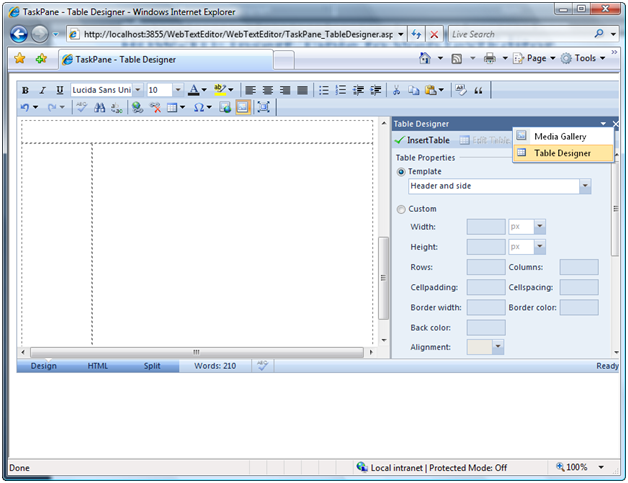
- Click the Task pane button and choose Table Designer.
- In Table Designer, you can freely customize the table to be inserted. Click Insert Table when you done customizing the table.
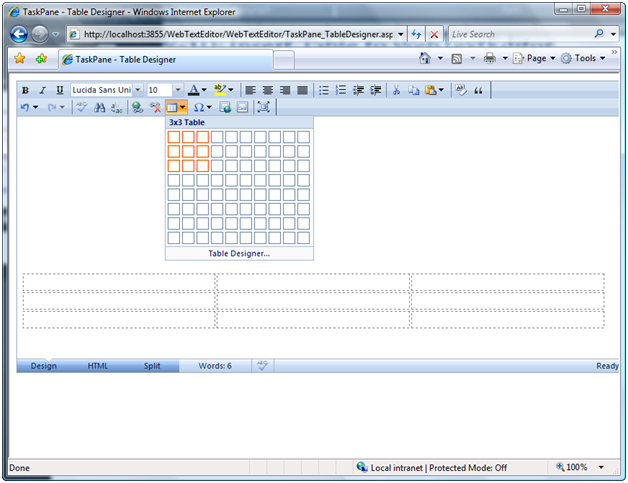
- Otherwise, you can simply click Insert Table command in the toolbar and customize the table directly.
 See Also
Other Resources
{Insert Table}